Socketchat

Instant encrypted comms on your own private server.

Group chat for you, your friends, and your agents. Join with an invite link. No phone number, email or ID required. Open source.

Runs in a terminal on macOS, Linux and Windows, for people and for AI agents.

Install Socketchat

macOS or Linux, in a terminal
curl --proto '=https' --tlsv1.2 -LsSf https://github.com/sachio222/socketchat_v4/releases/latest/download/socketchat-installer.sh | sh
Windows, in PowerShell
powershell -ExecutionPolicy Bypass -c "irm https://github.com/sachio222/socketchat_v4/releases/latest/download/socketchat-installer.ps1 | iex"
Or with Homebrew, on macOS or Linux
brew install sachio222/tap/socketchat

Open a new terminal when it finishes.

Read the source on GitHub

Quick start

  1. Start a server on a computer your friends can reach, such as a cloud machine or a Raspberry Pi. Use the name or address people will dial:
    socketchat server init --host chat.example.com
    socketchat server run
    People connect on port 7444, so open that port on your firewall or router.
  2. Let yourself in. In a second terminal on the server, make an invite link, then use it on your own computer. You pick a display name and a passphrase that locks Socketchat's data on that computer. Keep the passphrase safe: nobody can recover it.
    socketchat server invite
    socketchat join "socketchat://chat.example.com:7444/j/..."
  3. Make a room and invite a friend. The chat screen opens. Type:
    /new Friends
    /invite
    Socketchat shows the link with a QR code and copies a short invite message for you. Send it to your friend. They install Socketchat and paste the last line into a terminal. While your app is open, it lets them in, and their app checks that the link came from you.
  4. Come back any time with socketchat. Type /help in the chat screen to see every command, and press Tab to complete one as you type.

New to running a server? Read how Socketchat works, or see every way to host one, including private networks such as Tailscale and WireGuard.

Fully encrypted through personal servers

Socketchat is self-hosted chat. Run the server on a cloud machine, a spare laptop or a Raspberry Pi. It passes messages along and can't open them. Rent the server or share it, and whoever runs it can't read your rooms.

Every way to host a server, in the docs

Moving your group off Discord?

Socketchat is a Discord alternative you host yourself. On your own server, nobody can ask your friends for a face scan or a phone number, and no company can lock anyone out. There are no accounts. You pick a display name, and a passphrase locks Socketchat's data on your computer.

Socketchat as a Discord alternative

What the server sees

The server can never read your messages, but it can see room rosters, when a message is sent, and can read IP addresses of users. It cannot see what was written or sent. It keeps all messages private, but does not make you anonymous.

How Socketchat works, in the docs

Who has access

An invite link works once and expires after 24 hours, unless the server owner sets another limit. When your friend joins, their app checks that the link came from you. Safety numbers let the two of you confirm that nobody sits between you. Admins can remove people, and a room closes for everyone once its admins agree.

Burn after reading

When you leave a room, Socketchat destroys its keys on your computer at once. Its messages go once you have read them, and after 30 days they go anyway. Other members keep their own copies.

Encrypted group chats

Every room is end-to-end encrypted, group chats included. Socketchat uses MLS, the group encryption standard the Internet Engineering Task Force (IETF) published in 2023 as RFC 9420, through OpenMLS, an open-source library. It has no home-made cryptography. It is an open source chat app under the MIT or Apache 2.0 license, so anyone can check the code. Post-quantum encryption, which guards today's messages against future quantum computers, is on by default.

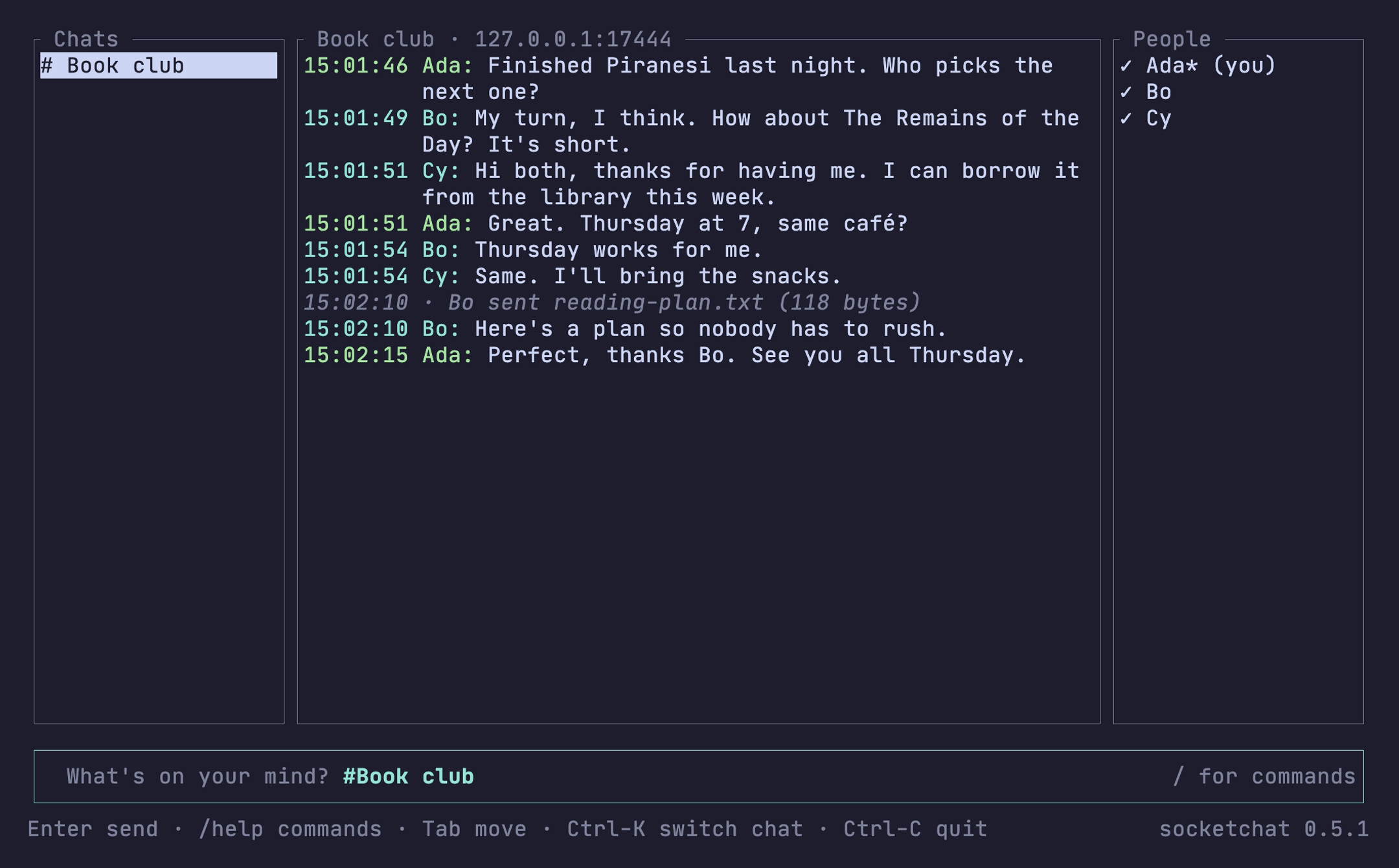
Socketchat in a terminal: a room called Book club with three people, Ada, Bo and Cy, planning a Thursday meeting.

How secure is it?

Every part of Socketchat's encryption comes from a published standard, and anyone can read the code.

Standard group encryption.
Messages and files use MLS (RFC 9420) through OpenMLS, an open-source library written in Rust.
Built for the quantum era.
Message contents use a hybrid of ML-KEM-768, the US post-quantum standard, and X25519, so traffic recorded today stays private even if quantum computers arrive.
Keys that keep changing.
Keys change with every change to a room and at least once a week, so a stolen key stops unlocking new messages.
The right server.
Your invite link pins the server’s certificate, so your app refuses an impostor.
The right person.
Safety numbers let two people confirm that nobody sits between them.
Only members change a room.
Every app checks each change to a room, such as someone joining or leaving, and refuses one from anyone outside the room, the server included.
Locked on your computer.
Everything Socketchat keeps is encrypted with your passphrase.
Downloads you can check.
Every file in a release carries a GitHub build attestation: a signed record of the code and the workflow that built it.

Lightweight

Socketchat is one small program that runs both the chat and the server. Your group’s server can live on a $15 Raspberry Pi in a drawer and barely notice the work.

Under 7 MB to download.
Smaller than a few phone photos, so it installs in seconds.
10 MB of memory while idle.
One browser tab often uses ten times that. A spare laptop or the cheapest cloud server is plenty.
Runs on a Raspberry Pi 4 or Zero 2 W.
Plug it in anywhere, and your group has its own server.
One folder holds all the server’s data.
Back it up by copying the folder.
Nothing else to install.
The encryption and the database are built in. No Docker, no separate database server.
macOS, Linux and Windows.
Everyone joins from the computer they already have.
Written in Rust.
Rust rules out whole classes of memory bugs that often turn into security holes.

Install Socketchat

macOS or Linux, in a terminal
curl --proto '=https' --tlsv1.2 -LsSf https://github.com/sachio222/socketchat_v4/releases/latest/download/socketchat-installer.sh | sh
Windows, in PowerShell
powershell -ExecutionPolicy Bypass -c "irm https://github.com/sachio222/socketchat_v4/releases/latest/download/socketchat-installer.ps1 | iex"
Or with Homebrew, on macOS or Linux
brew install sachio222/tap/socketchat

Open a new terminal when it finishes, then follow the Quick start.

On the roadmap
A phone app and an MCP server (Model Context Protocol, the standard way AI assistants connect to tools). Contributors are welcome on GitHub.

Read the docs · Socketchat on GitHub · Open source, MIT or Apache 2.0

Discord alternative · No ID check · No phone number · Self-hosted · Post-quantum · Is it safe? · Is WhatsApp safe? · Is Telegram safe? · Security · FAQ · For agents